


Published: | Category: Tutorial
... and Subtitle Formats, Accessibility, and Compliance
Captions and subtitles are no longer optional extras for modern media. They are essential for accessibility, audience reach, SEO, social media engagement, legal compliance, and professional media workflows.
Whether you are publishing YouTube videos, podcasts, online courses, livestreams, marketing videos, or enterprise training materials, understanding caption formats and accessibility requirements can dramatically improve the quality and reach of your content.
What Are Captions?
Captions are synchronized text representations of spoken audio and important sound cues in a video.
Good captions include spoken dialogue, speaker identification, sound effects, music indicators, and emotional context when necessary.
[door slams]

            SARAH:
            We need to leave now.

            [dramatic music intensifies]
Captions vs Subtitles
Many people use the terms interchangeably, but technically they are different.
| Type | Purpose | Includes Sound Effects? | Intended Audience |
|---|---|---|---|
| Captions | Accessibility | Yes | Deaf/hard-of-hearing viewers |
| Subtitles | Translation or transcription | Usually no | Viewers who can hear the audio |
Closed Captions vs Open Captions
Closed Captions
Closed captions can be turned on or off and are usually delivered as a separate caption file.
Open Captions
Open captions are permanently burned into the video and cannot be disabled.
Common Caption and Subtitle Formats
SRT
SRT, or SubRip Subtitle, is the most common subtitle format. It is simple, widely supported, and easy to edit.
            1
            00:00:01,000 --> 00:00:04,000
            Welcome to the presentation.

            2
            00:00:05,000 --> 00:00:08,000
            Today we're discussing accessibility.
VTT
WebVTT is the modern web caption format. It works well with HTML5 video and supports styling, positioning, and metadata.
            WEBVTT

            00:00:01.000 --> 00:00:04.000
            Welcome to the presentation.
ASS
ASS, or Advanced SubStation Alpha, supports advanced subtitle styling, positioning, fonts, and effects. It is common in anime and stylized subtitle workflows.
TTML and DFXP
TTML and DFXP are XML-based caption formats often used in broadcast, enterprise, and professional streaming workflows.
SCC
SCC is a professional closed caption format commonly associated with broadcast television and post-production workflows.
SBV
SBV is a lightweight subtitle format associated with YouTube and simple timestamped caption workflows.
LRC
LRC is mainly used for synchronized lyrics and karaoke-style timing.
Which Caption Format Should You Use?
| Use Case | Recommended Formats |
|---|---|
| General video publishing | SRT, VTT |
| Web applications | VTT |
| Broadcast television | SCC, TTML |
| Professional streaming | TTML, DFXP |
| Styled subtitles | ASS |
| YouTube | SRT, SBV |
Accessibility and WCAG
Captions are a major part of web accessibility. WCAG, or Web Content Accessibility Guidelines, provides standards for making digital content more accessible.
WCAG 1.2.2: Captions for Prerecorded Content
Prerecorded video with audio should provide captions.
WCAG 1.2.4: Captions for Live Content
Live synchronized media should provide captions when possible.
Caption quality matters. Accessibility is not just about having a caption file. Captions should be accurate, synchronized, complete, and readable.
Accessibility Laws and International Compliance
Captions and accessible media are increasingly required by law, policy, and accessibility standards around the world. Organizations that publish video content for the public, education, government, or enterprise environments should understand the legal and compliance landscape surrounding captions and transcripts.
Accessibility laws vary by country, but many share common goals:
- Providing equal access to digital media
- Supporting Deaf and hard-of-hearing users
- Ensuring educational accessibility
- Improving usability across devices and environments
- Reducing barriers to online communication and learning
United States Accessibility Laws
Americans with Disabilities Act (ADA)
The Americans with Disabilities Act (ADA) is one of the most important accessibility laws in the United States.
Although originally written before modern internet platforms became widespread, courts and regulatory guidance increasingly interpret the ADA as applying to websites, online video content, streaming services, educational content, and digital experiences.
Organizations that fail to provide accessible media may face:
- Accessibility complaints
- Civil lawsuits
- Settlement agreements
- Reputational damage
Captions are commonly viewed as a core part of making video content accessible under ADA-related expectations.
Section 508
Section 508 applies to U.S. federal agencies and many government contractors.
It requires electronic and information technology to be accessible to people with disabilities.
This often includes:
- Captions for prerecorded videos
- Accessible video players
- Transcripts for media content
- WCAG-aligned accessibility standards
Educational institutions and organizations working with federal funding frequently align with Section 508 requirements.
CVAA (21st Century Communications and Video Accessibility Act)
The CVAA focuses heavily on video accessibility and online media distribution.
Among other requirements, it mandates captions for certain online video content that previously aired on television in the United States.
This law affects:
- Broadcasters
- Streaming providers
- Media companies
- Digital video distributors
The CVAA played a major role in expanding caption expectations across online video ecosystems.
Educational Accessibility in the United States
Schools, universities, and online learning platforms increasingly require captions and transcripts as part of accessible learning initiatives.
This is especially important for:
- Public universities
- K-12 educational systems
- Federally funded institutions
- Online course providers
- Corporate training systems
Accessibility complaints involving uncaptioned educational videos have resulted in multiple high-profile settlements and policy changes.
International Accessibility Standards and Laws
WCAG (Web Content Accessibility Guidelines)
WCAG is not a law itself, but it is the most widely recognized international accessibility standard.
Published by the World Wide Web Consortium (W3C), WCAG provides guidance for making websites, applications, and digital media accessible.
Many countries base their accessibility regulations directly on WCAG compliance.
Important caption-related WCAG requirements include:
- Captions for prerecorded video
- Captions for live media when possible
- Accessible synchronized media alternatives
- Readable and understandable media content
European Accessibility Act (EAA)
The European Accessibility Act establishes accessibility requirements across European Union member states.
It applies to many digital products and services, including:
- Streaming platforms
- E-commerce systems
- Digital communications
- Online media services
WCAG standards heavily influence compliance expectations under the EAA.
EN 301 549
EN 301 549 is a major European accessibility standard for information and communication technology.
It incorporates WCAG accessibility requirements and is commonly used in:
- Government procurement
- Public-sector digital services
- Enterprise accessibility compliance
Captioning and accessible multimedia are important components of the standard.
United Kingdom Accessibility Regulations
The United Kingdom has implemented accessibility regulations for public sector websites and mobile applications.
These regulations strongly align with WCAG requirements and emphasize accessible media, including captions and transcripts.
Canada Accessibility Laws
Canada has multiple accessibility frameworks, including:
- Accessible Canada Act (ACA)
- Accessibility for Ontarians with Disabilities Act (AODA)
These laws encourage or require accessible digital content and media accessibility practices.
Australia Disability Discrimination Act
Australia's Disability Discrimination Act (DDA) has influenced digital accessibility expectations, including media accessibility and captioning practices.
WCAG is commonly referenced in Australian accessibility guidance.
International Accessibility Trends
Globally, accessibility standards are increasingly converging around:
- WCAG compliance
- Captioned media
- Accessible video players
- Transcripts and synchronized alternatives
- Inclusive digital experiences
Even when captions are not explicitly required by a specific law, many organizations adopt captioning as part of broader accessibility, usability, and inclusion initiatives.
Why Accessibility Compliance Matters
Accessible media benefits far more than legal compliance alone.
Captions help:
- Deaf and hard-of-hearing viewers
- Non-native speakers
- Users in noisy environments
- Users watching muted autoplay video
- Search engine indexing and SEO
- Educational comprehension and retention
Modern caption workflows are increasingly viewed as both an accessibility requirement and a best practice for professional digital publishing.
Captioning Statistics and Industry Trends
Captions and transcripts are no longer considered niche accessibility features. They have become a standard part of modern digital publishing, social media distribution, online education, enterprise communication, and streaming media workflows.
Several major industry trends have accelerated the adoption of captions and transcripts across the internet.
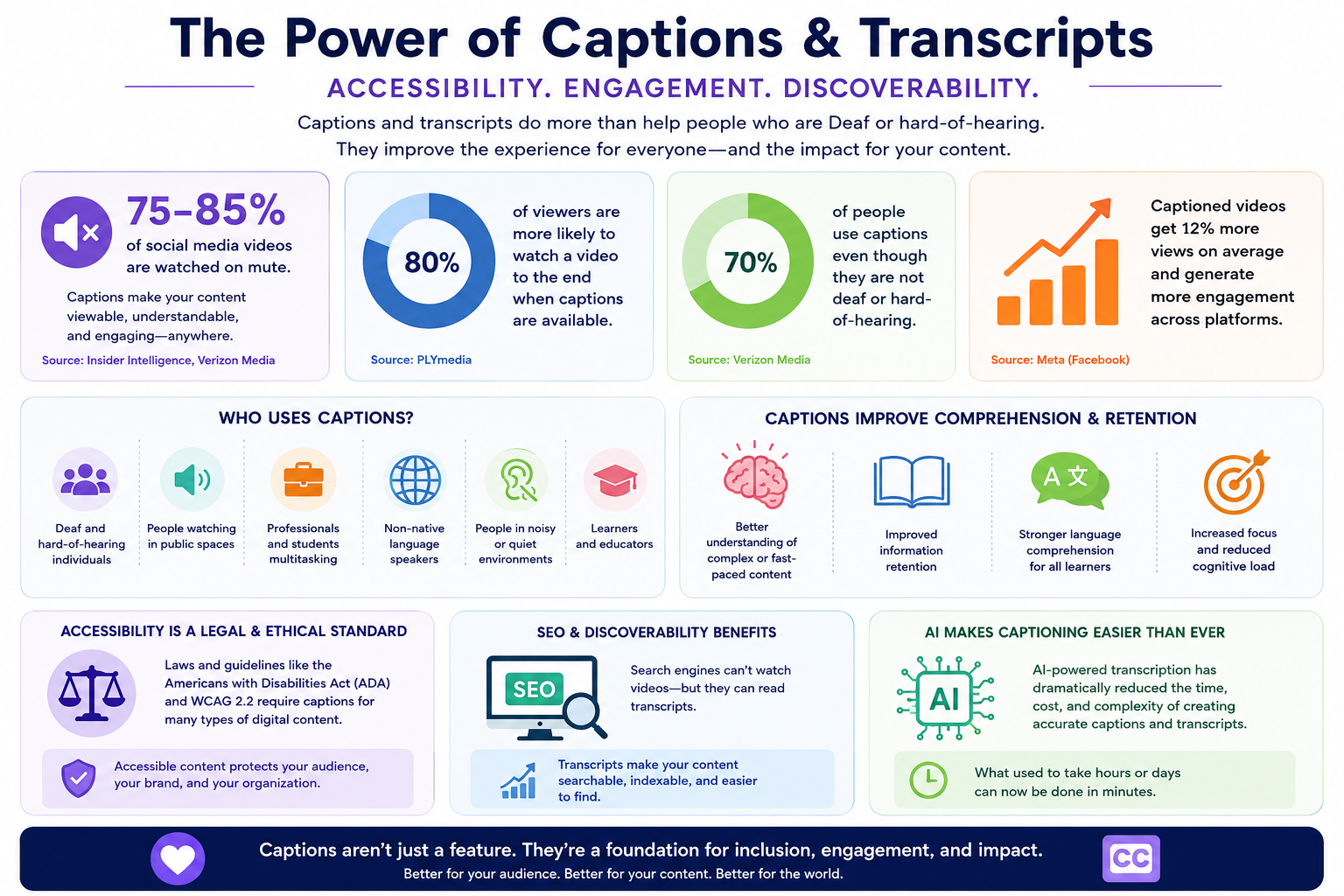
Muted Video Consumption Continues to Rise
Modern social media platforms heavily encourage muted autoplay video experiences.
As a result, captions have become essential for:
- Viewer retention
- Mobile viewing
- Silent autoplay feeds
- Public-space viewing
- Short-form social content
Marketing and media studies frequently report that a large percentage of social video is watched without sound, especially on mobile devices.
This has transformed captions from a pure accessibility feature into a mainstream engagement tool.
| Viewing Behavior | Impact on Captions |
|---|---|
| Muted autoplay feeds | Captions become critical for context and engagement |
| Mobile-first viewing | Captions improve readability in noisy environments |
| Short-form social video | Readable subtitles improve retention and completion rates |
| Global audiences | Captions support non-native language comprehension |
Many Caption Users Are Not Deaf or Hard-of-Hearing
One of the most important misconceptions about captions is that they are only used by Deaf or hard-of-hearing audiences.
In reality, captions are commonly used by:
- People watching videos in public spaces
- Users multitasking while consuming content
- Non-native speakers
- Students and researchers
- Users in noisy or quiet environments
- Mobile viewers watching muted video
This broader usage has significantly expanded the importance of caption workflows across the web.
Captions Improve Comprehension and Retention
Educational and accessibility research consistently shows that captions can improve comprehension and information retention for many users.
Captions may help viewers:
- Understand technical terminology
- Follow fast-paced speech
- Retain educational material
- Improve language comprehension
- Maintain focus during long-form content
This is one reason captions are increasingly common in:
- Online learning platforms
- Corporate training systems
- Webinars
- Educational institutions
- Professional presentations
Accessibility and SEO Increasingly Overlap
Captions and transcripts can also improve discoverability and search engine indexing.
Search engines cannot fully interpret spoken audio directly, but transcript text provides searchable content that can help:
- Improve long-tail search visibility
- Increase keyword relevance
- Support content indexing
- Improve discoverability of educational and media content
This creates a strong overlap between:
- Accessibility goals
- SEO strategies
- Content marketing
- Media discoverability
AI Captioning Has Lowered the Barrier to Entry
Modern AI transcription systems have dramatically reduced the cost and complexity of creating captions and transcripts.
Organizations that previously avoided captioning due to:
- cost
- time requirements
- manual labor
- technical complexity
can now generate transcripts and captions significantly faster using AI-assisted workflows.
This has accelerated adoption across:
- podcasting
- streaming
- education
- enterprise communication
- marketing teams
- creator workflows
Accessibility Expectations Continue to Grow
Accessibility expectations are increasing globally across public-sector, educational, and commercial digital platforms.
Many organizations now treat captions and transcripts as standard publishing requirements rather than optional enhancements.
As accessibility laws, WCAG adoption, and inclusive design initiatives continue to evolve, captions are becoming a foundational part of professional media publishing workflows.
Captioning Best Practices
- Keep captions readable.
- Avoid large text blocks.
- Use accurate timing.
- Identify speakers when necessary.
- Include meaningful sound cues.
- Review AI-generated captions before publishing when accuracy matters.
AI Captioning vs Human Captioning
AI captioning is fast, affordable, and useful for drafts, podcasts, internal workflows, and rapid publishing. Human review is still important for broadcast, legal content, accessibility-critical media, and high-accuracy requirements.
Modern Caption Workflows
            Audio or video
            ↓
            AI transcription
            ↓
            Cleanup and speaker detection
            ↓
            Caption optimization
            ↓
            Export formats
            ↓
            Platform delivery
Workflow Modes vs Processor Quality Modes
Modern transcription systems increasingly separate two different concepts:
- Processor quality modes (how the transcript is generated)
- Workflow modes (what the transcript is intended for)
This distinction is important because a highly accurate transcript and a subtitle-optimized workflow are not necessarily the same thing.
For example:
- An interview may need maximum speech recognition accuracy.
- A podcast workflow may need show notes and summaries.
- A meeting workflow may prioritize action items and decisions.
- A caption workflow may prioritize readability and subtitle pacing.
Modern media transcription platforms often combine:
- a transcription processor
- a workflow mode
- an export profile
- AI enhancement pipelines
to create more specialized outputs.
| Mode | Primary Purpose | Focus | Typical Outputs | Best For | Workflow Characteristics |
|---|---|---|---|---|---|
| Standard | Balanced transcription | General-purpose speed and affordability | Transcript, TXT, SRT, VTT | General media transcription | Fast processing, lightweight cleanup, broad compatibility |
| Pro | Improved transcript quality | Better punctuation, readability, and recognition | Higher-quality transcripts and captions | Professional recordings, business content, interviews | Enhanced language handling and improved formatting quality |
| Enhanced | Maximum transcription accuracy | Speech recognition quality | Highly accurate transcript output | Noisy audio, lectures, difficult recordings, important interviews | Higher-quality AI models, more aggressive accuracy optimization |
| Speaker-Aware | Speaker identification and diarization | Separating multiple speakers | Speaker-labeled transcripts | Meetings, podcasts, interviews, discussions, panels | Speaker segmentation, diarization, conversational formatting |
| Podcast Workflow | Podcast publishing workflows | Content summarization and audience-friendly presentation | Show notes, summaries, chapters, transcripts | Podcasts, long-form discussions, creator workflows | Chapter optimization, topic grouping, summary generation, SEO-friendly outputs |
| Meeting Workflow | Business and collaboration workflows | Actionable meeting intelligence | Meeting summaries, action items, decisions | Corporate meetings, Zoom calls, team collaboration | Decision extraction, follow-up tracking, structured summaries |
| Caption Mode | Subtitle and caption delivery | Readability and subtitle pacing | SRT, VTT, ASS, TTML, DFXP, SCC | Streaming, YouTube, social media, accessible video | Caption optimization, subtitle segmentation, readability-focused cleanup |
| Accessibility Workflow | Accessible media publishing | Compliance and inclusive media | Captions, transcripts, accessible media exports | Education, government, enterprise accessibility | WCAG-aware captioning, transcript generation, accessibility-focused formatting |
Why These Modes Matter
Older transcription systems often treated all workflows as simple transcript generation.
Modern systems increasingly separate:
- transcription accuracy
- workflow intent
- AI enhancement behavior
- caption optimization
- export formatting
This allows the same media file to produce very different outputs depending on the intended use case.
For example:
- A podcast workflow may generate chapters and show notes.
- A meeting workflow may generate decisions and action items.
- A caption workflow may optimize subtitle readability and timing.
- An enhanced transcription workflow may prioritize speech recognition accuracy above all else.
As AI-powered media systems evolve, workflows are increasingly becoming:
- workflow-aware
- caption-aware
- accessibility-aware
- output-aware
- provider-aware
rather than functioning as simple transcription engines alone.
Final Thoughts
Captions are no longer a niche accessibility feature. They are a core part of digital publishing, media accessibility, SEO, education, and audience engagement.
Understanding caption standards, workflow formats, accessibility requirements, export pipelines, and WCAG guidance helps creators and organizations build media experiences that are more professional, compliant, and inclusive.